How to play Badminton
Free to play in your browser - no install, no download.
Play now ▶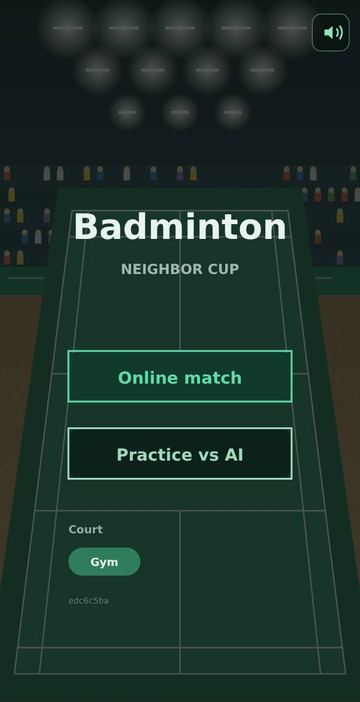
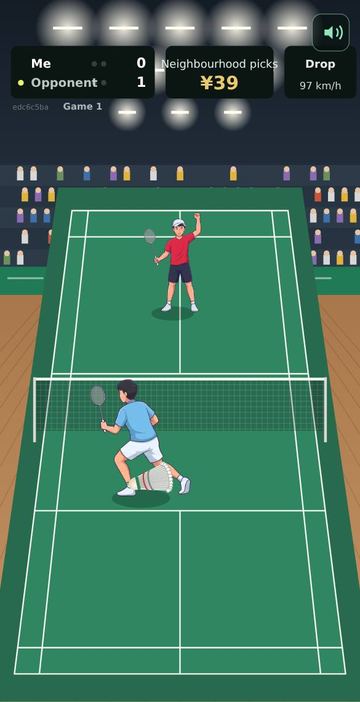
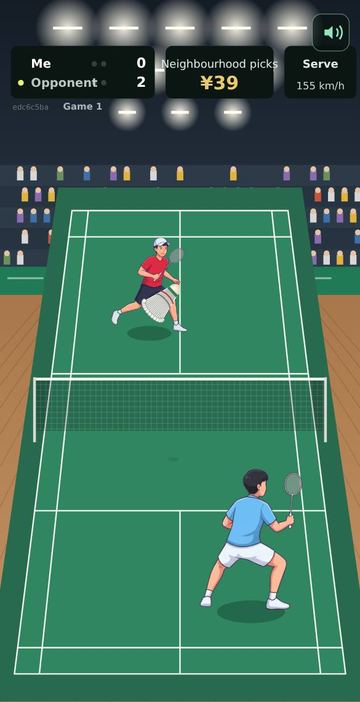
Badminton is a singles match in an indoor gym, with ceiling lights, a crowd in the stands and a wooden floor around a green court. The court is drawn to the real proportions of a 13.4 m by 6.1 m singles court, with short service lines, a centre line and a net across the middle. You play from the near side and your opponent stands beyond the net.
Your player runs to the shuttle by itself. Your job is the stroke: when the shuttle is about to reach you, one swipe decides whether it becomes a high clear, a soft drop or a smash. The panel at the top shows the name of every shot and its speed in km/h. A clear reads around 190 to 230, a drop 80 to 110, and a smash 280 to 360.
How to play
- On the start screen tap Practice vs AI to play the computer, or Online match to open a room for a friend.
- Serves go out on their own after a short pause, diagonally into the opposite service box.
- Watch for the yellow ring. It appears around the shuttle just before it reaches you and tightens as the moment comes closer.
- While the ring is showing, tap or swipe. Swipe up for a clear, swipe down for a drop, and swipe down hard and fast while the shuttle is still high for a smash. A plain tap plays a clear.
- Where your finger lifts off the screen sets the direction: release on the left half to send the shuttle left, on the right half to send it right.
- When one player wins two games, a result screen lists the score of each game. Tap Play again for a new match.
Controls
| Action | How |
|---|---|
| Clear | Swipe up, or just tap (touch or mouse) |
| Drop | Swipe down |
| Smash | Fast or long swipe down while the shuttle is high |
| Aim | Lift your finger left or right of the screen centre |
| Sound on or off | Speaker button at the top right, remembered next time |
| New match | Play again on the result screen |
Rules
- Every rally scores a point, and the winner of the rally serves next.
- A game goes to 21 points. From 20-20 a player needs a 2-point lead, and at 29-29 the next point wins at 30.
- A match is the best of three games. The dots next to each name show games won.
- The serve must land in the diagonal service box. The box depends on whether the server's score is odd or even. A serve outside it is a Fault.
- A shot that does not cross the net is a Net. A shot that lands beyond the sideline or baseline is Out, and the line it crossed glows. A shuttle you fail to return scores for the player who hit it.
- Each player stays in their own half, at least 0.3 m back from the net.
Tips
- Do not swipe too early. The ring shows the hitting window, so wait for it to appear around the shuttle.
- Smashes need height. When the shuttle is low, a fast downward swipe becomes a drop instead.
- The computer misses more often on smashes and on shuttles sent far from where it is standing, so mix wide clears with sudden drops.
- The speed in the top panel tells you at once whether your swipe became a smash or a drop.
FAQ
Do I have to run with my player?
No. Both players move on their own. You only choose the stroke and its direction.
How do I play with a friend?
Tap Online match. A room code appears on the court with a note to send the link to a friend. Inside WeChat it points you to the menu at the top right instead. When the friend opens the link, the code panel disappears, and each phone shows its own player on the near side.
What if my friend leaves during a match?
A message says the friend has left and an Opponent offline tag appears. The computer takes over the empty side so the match can carry on.
How does a rematch work online?
Both players tap Play again on the result screen. The first one to tap sees Waiting until the other taps too.
Which languages are there?
English, Korean and Chinese. On this site it follows your browser language, and ?lang=en or ?lang=ko in the address chooses one directly.
Is there anything to install?
No. It runs in the browser on phones and computers, free, with no account needed.
 Driving Range
 Pool & Carom
 Tennis
 Ping Pong