How to play Driving Range
Free to play in your browser - no install, no download.
Play now ▶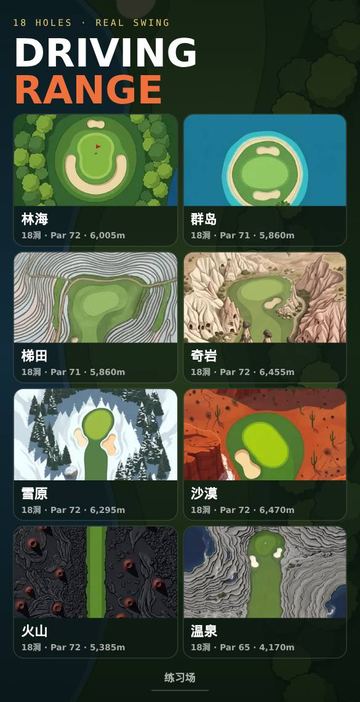
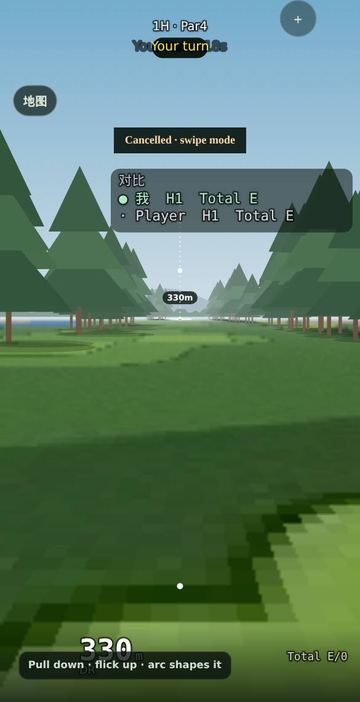
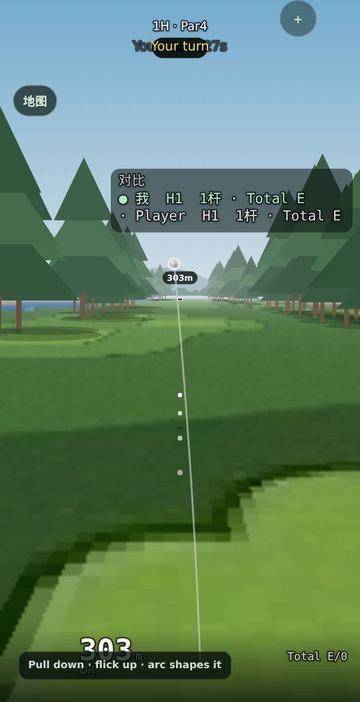
Driving Range is a free 18-hole golf simulation that runs in your browser with nothing to install. The start screen is a grid of course cards, each showing 18 holes, its par and its total length in metres. Courses include a forest layout, Philippine-style islands, rice terraces, the rock towers of Cappadocia, a snowfield, a desert, a volcano, a hot-spring course (par 65), a coral atoll, Lake Natron, a sunken city, the Serengeti, a water village, Provence, a coffee-farm course and Danwon. Most are par 72; a few are par 71.
The ball flight is modelled with real numbers: a 45.93 g ball, air drag, backspin lift and roll after landing. Each club has its own loft, head speed and spin, so a 9 iron climbs steeply and stops quickly while the driver flies low and runs.
How to play
- Tap a course card. A sheet opens with two choices: play against the AI (pick Easy, Normal or Hard) or invite friends to play together.
- Choose how you swing. Swipe mode uses your finger and works sitting down. Real swing mode turns the phone into the club: read the safety note, hold the phone upright like a grip, then stay still for 3 seconds so the game can measure gravity.
- Pick a club from the top-left club button. The 9 iron, pitching wedge, 52 and sand wedge also allow partial swings at 15, 30, 50 and 70 percent for short approach shots.
- Hit to the green, then putt. Putting is done with a swipe in either mode, and a finished hole moves you to the next one on the scorecard.
- The Practice Range button at the bottom of the start screen opens an open range with no score, good for learning club distances.
Controls
| Action | How |
|---|---|
| Full shot (swipe mode) | Drag down to take the club back, then flick up. The curve of your stroke shapes the shot: draw, straight or fade. |
| Full shot (real swing) | Tap SWING or swipe down to get ready, hold still for half a second until 'ready' shows, then swing the phone; the backswing starts recording by itself. |
| Change club | Tap the club button at the top left |
| Putt | Swipe on the green (real swing mode can also putt with a short phone stroke) |
| Switch mode | Info panel: switch between swipe and real swing |
Rules
- Standard club distances: Driver 239 m, 3W 225, 5W 210, hybrid 195, 4I 180, 5I 168, 6I 159, 7I 150, 8I 137, 9I 123, PW 103, 52 degree 92, SW 78 m, plus a putter.
- Landing in water costs one penalty stroke and the ball is dropped; out of bounds also costs one stroke and you play again from the same spot.
- Woods cannot be used from a bunker.
- A putt that stops within 1 m of the cup is conceded and counted as one more stroke.
- A hole is picked up at double par, so one bad hole cannot run forever.
- The scorecard splits the round into OUT (holes 1-9) and IN (holes 10-18).
Tips
- In real swing mode a normal, relaxed swing gives the listed club distance; swinging much harder only adds a little, so work on direction first.
- After a real swing, the analysis shows attack angle, face and path. Face minus path tells you why a ball curved: out-to-in with an open face is a slice.
- For shots of 10 to 30 m around the green, use a wedge at 15 or 30 percent instead of a putter from the fringe.
FAQ
Do I need to swing my phone?
No. Swipe mode is the default and needs only a finger. Real swing mode is optional and falls back to swipe if your device has no motion sensors or you deny sensor permission.
Is it safe to swing the phone?
The game asks you to wear a wrist strap and clear the space around you before calibrating. Only use it where nobody and nothing is nearby.
How do I play with friends?
Tap a course, choose the invite option and share the link. The link carries a room code plus the course, and 2 to 4 players each play their own round while scores sync after every hole.
How strong is the AI?
Easy, Normal and Hard change its hitting distance, direction error and putting. It takes turns with you through the same scorecard.
Which languages are supported?
English, Korean and Chinese; add ?lang=en, ?lang=ko or ?lang=zh to the address to choose.
 Pool & Carom
 Tennis
 Ping Pong
 Badminton