How to play Tennis
Free to play in your browser - no install, no download.
Play now ▶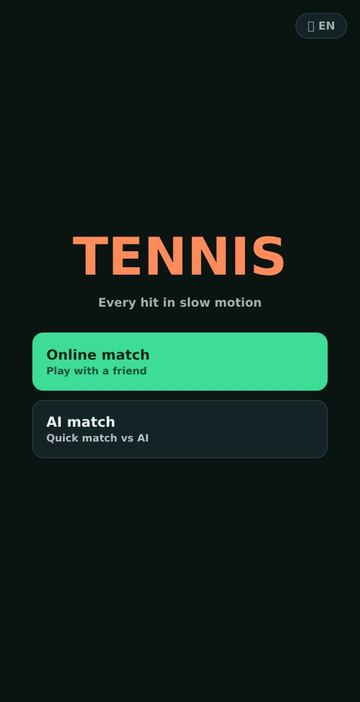
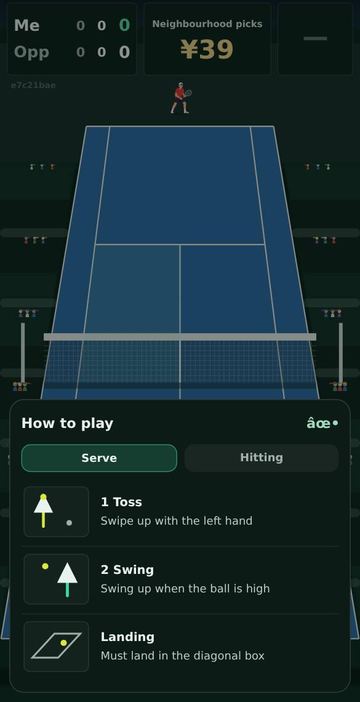
Tennis is a free singles tennis match you play in the browser with finger swipes. The court uses real measurements: 23.77 m long with the net at 11.885 m, a 0.914 m net height at the centre and 6.40 m service boxes, and the ball bounces and slows with its own air drag and spin. Your player moves toward the ball on their own, so the whole game is about timing and direction.
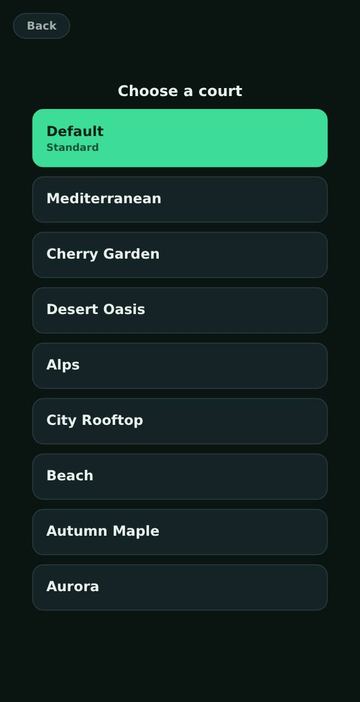
The home screen offers two buttons: Online match (play with a friend) and AI match (a quick game right away). Either one leads to a court picker with nine settings: the default hard court, Mediterranean, Cherry Garden, Desert Oasis, Alps, City Rooftop, and three animated courts, Beach, Autumn Maple and Aurora. The courts change the scenery and colours, not the physics, so every court plays the same.
How to play
- Choose Online match or AI match, then tap a court. A short how-to sheet opens the first time a court loads.
- Serve in two strokes. Swipe up on the left half of the screen to toss the ball, then swipe up again to hit it while the ball is high. The serve must land in the diagonal service box. The serve speed is shown in km/h.
- To return, wait for the ball to come to you and swipe toward where you want it to go. A quicker, longer swipe hits harder; the swipe angle sets the direction.
- Timing is graded Perfect, Good, Early or Late. Perfect shots stay inside the lines more often; early or late shots spray wider and can sail long or into the net.
- Points restart on their own after a short pause, and the scoreboard shows whose serve or receive is next.
Controls
| Action | How |
|---|---|
| Toss (serve) | Swipe up on the left half of the screen |
| Serve hit | Swipe up while the tossed ball is high |
| Groundstroke / volley | Swipe toward the target as the ball arrives; speed of the swipe = power |
| Movement | Automatic, the player follows the ball |
| Hawk-Eye replay | Short tap in the top band of the screen |
| Language | Globe button on the home screen cycles Chinese, EN, Korean, VI |
Rules
- Points count 0, 15, 30, 40. At 40-40 the board shows DEUCE, then AD-ME or AD-OP; a game needs at least four points and a two-point lead.
- A set is won with six games and a two-game lead, or by reaching seven games. The serve passes to the other player after each game.
- Two faults in a row is a double fault and gives the point away. Hawk-Eye shows automatically on serve faults.
- Calls on screen are IN, OUT, NET, FAULT and MISS (a swing that did not touch the ball).
Tips
- Do not try to run: the feet follow the ball automatically. Watch the ball and time the swipe instead.
- Toss first, then wait for the ball to rise before the second swipe. Swiping too soon or too late costs accuracy.
- Aim a little inside the sidelines. Perfect timing pulls the ball inward, while early and late timing push it out wide.
- If you are unsure about a call, tap the top strip to see the Hawk-Eye mark of where the ball first bounced.
FAQ
How does online play work?
Choose Online match and a court. The game makes a 4-character room code, shows it on the scoreboard and adds it to the page address. Send that link to a friend; the host's court choice is used for both players and the host keeps the official score.
Can I play alone?
Yes. AI match starts a game against a computer player straight away.
Do different courts play differently?
No. All nine courts use one bounce and friction model; only the background, colours and camera change.
Does it work with a mouse?
Yes. The controls are pointer swipes, so a mouse drag works the same way as a finger.
Which languages are there?
Chinese, English, Korean and Vietnamese, switchable from the globe button or with ?lang= in the address.
 Driving Range
 Pool & Carom
 Ping Pong
 Badminton