How to play Mountain Trail MTB
Free to play in your browser - no install, no download.
Play now ▶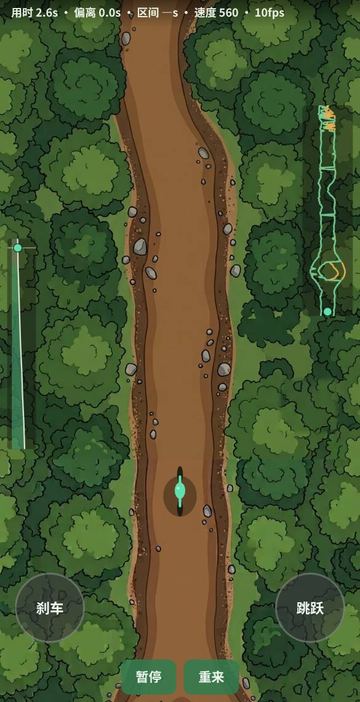
Mountain Trail MTB is a top-down ride down an endless mountain trail. You see the path from above, with your rider fixed near the bottom of the screen and the ground scrolling toward you. The job is simple to say and hard to do well: keep your wheels on the dirt.
The trail is built from 9 sections: Roots, Tree Island, Tabletop, Water, Rock Split, Ladder, Rock Garden, Plain and Narrow. They follow each other in a fixed shuffled order, so a run never ends. In some places the trail splits into two lines and you choose which one to take. It runs in the browser on a phone or a computer, with nothing to install.
How to play
- The trail images load first (the counter shows 9 of 9), then the ride begins at once.
- Drag left or right anywhere on the trail to shift your weight and move the bike across the path. Movement follows your finger in proportion to the screen width. When you let go the bike keeps drifting a little and then settles, like real momentum.
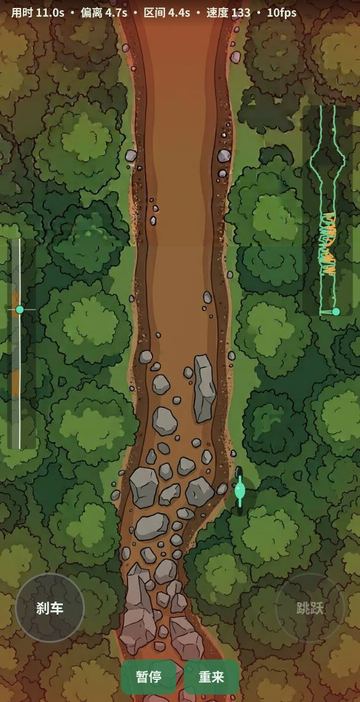
- Stay on the brown dirt. On the trail you speed up steadily. Leave it and a red glow closes in at the edges while the bike slows down hard.
- Hold the brake button at the bottom left to scrub speed before a tight spot. Tap the jump button at the bottom right to hop over an obstacle or a gap.
- The top line shows total time, time spent off the trail, the time of the last finished section and your current speed. Use the bottom buttons to pause or restart.
Controls
| Action | How |
|---|---|
| Steer (shift weight) | Drag left or right on the trail with a finger or mouse |
| Brake | Press and hold the round button at the bottom left |
| Jump | Tap the round button at the bottom right (it greys out when a jump is not allowed) |
| Pause / resume | Left button in the bottom bar |
| Restart from zero | Right button in the bottom bar |
Rules
- Speed starts at 380 on the readout and climbs toward a top speed of 560 while you stay on the dirt.
- Off the trail your speed drops quickly, down to about a third of the starting speed, and the off-trail timer runs.
- Big, fast swings from side to side cost speed, as if you were scrubbing through a corner.
- Braking slows you to a floor of 90 but never to a full stop.
- A jump lasts longer the faster you go (between 0.4 and 1 second). Landing takes a bit of speed off, and you must wait 0.4 seconds before the next jump.
- Where you land matters: touching down outside the dirt counts as leaving the trail. You cannot jump while you are already off it.
Tips
- Watch the minimap at the top right. It shows the next two and a half sections as lines, with the second branch of a split drawn in orange, so you can move across before the fork arrives.
- The narrow panel on the left is an elevation profile of the current section. Orange marks climbs and green marks descents, and a dot shows where you are on it.
- Short, smooth drags keep your speed. Wild swipes trigger the cornering slowdown.
- Jump early and aim to land in the middle of the path. A long jump at top speed is easy to overshoot.
- The section timer resets at each new section. Try to beat your own time on a section you know.
FAQ
Does the trail ever end?
No. The 9 sections repeat in a fixed shuffled order forever. Restart puts the clock back to zero.
Is there a score?
There are no points. You get three timers (total, off trail, last section) and a speed readout, and the aim is to keep off-trail time low.
Do I need to tilt my phone?
No. Steering is done only by dragging. The game does not use the motion sensor.
Can I brake and steer at the same time?
Yes. The brake and jump buttons are separate from the drag area, so you can hold the brake with one thumb and steer with the other.
Why are the labels not in English?
The on-screen labels are currently in Chinese only. Bottom left is Brake, bottom right is Jump, and the bottom bar is Pause and Restart.
 Snowboard
 Clay Shooting
 Steppe Horse Archery